
You open an email that needs a thoughtful reply.
You find a course you want to continue, a form you need to complete, or a document you should review before Friday.
The intention is real. You mean to return.
Then another tab opens. A message arrives. The browser moves on, and the action quietly disappears with the page.
Hours or days later, you may remember that something needed your attention, but not what it was, where it was, or what you planned to do next.
The task did not become less important. It simply left your field of view.
When an action disappears from awareness
Within ADHD communities, people sometimes use the phrase “object permanence” to describe an “out of sight, out of mind” experience.
This is not object permanence in its clinical, developmental meaning. Adults do not suddenly believe that a hidden email, document, or responsibility has stopped existing. Instead, the phrase is commonly used as a metaphor for the difficulty of keeping something present in your awareness without a visible cue.
A more accurate description is that some people find it harder to recall or prioritise tasks once those tasks are no longer visible. External cues and reminders can help bring them back into awareness. Simply Psychology explains this distinction, while Life Skills Advocate outlines visibility and context-based reminders as practical workarounds.
This experience is not limited to any single group. A closed tab, buried notification, crowded inbox, or forgotten bookmark can make an intention disappear for almost anyone.
Visibility is part of the system
Good reminders do more than preserve information. They make the right information visible at a useful moment.
This is why people place important items near the door, keep notes where they naturally look, or set reminders for ordinary actions, not only major appointments. The environment carries part of the responsibility for remembering.
Digital tools should be able to do the same.
Instead of expecting you to repeatedly check another list, the system should meet you where the intention was created and bring that intention back when it is time to act.
That is the idea behind Luzora.
The system should not only save the task. It should help the task become visible again.
Luzora begins where the intention is formed
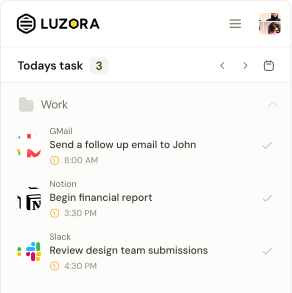
Luzora lives in the browser because that is where many intentions begin.
You are already looking at the email, application, article, course, chart, document, or website that requires an action. You can capture the task while the page and your reason for returning are still clear.
Rather than saving only a sentence such as “Reply tomorrow,” Luzora can keep the task connected to the page where the reply needs to happen.
You decide what you need to do, where you need to do it, and when you want to return.
The task no longer has to survive as a loose thought. Luzora preserves both the intention and its destination.
Auto Return brings forgotten actions back into view
A normal reminder can tell you that it is time to do something.
Auto Return goes a step further by helping the place where the action happens reappear.
Imagine opening an important email and creating the task “Reply to this email tomorrow at 10:00 AM.”
When the task becomes due, Auto Return can bring you back to that email instead of leaving you with a notification and expecting you to find it again.
The same structure can work for a course lesson, an application deadline, a document awaiting approval, an invoice follow-up, an article you want to read, or a saved chart you need to review.
Before returning, Luzora displays a short countdown on the page you are currently viewing. You can go immediately, cancel the automatic return, or dismiss the visual warning.
If the destination is already open, Luzora can focus the matching tab without unnecessarily reloading it. If it is not open, Luzora can create a new tab instead of replacing the unrelated page you are using.
Auto Return is optional and remains under the user’s control. It must be enabled, applies to eligible timed tasks with saved destinations, and depends on the browser being open when the task becomes due.
A reminder tells you what to do. Auto Return can bring back the place where you can do it.
A reminder tells you. A return restores the context.
“Continue your course” may be accurate, but it still leaves questions: Which course? Which lesson? Where did you stop?
“Review the document” can create the same friction: Which document? Where is it? What needed reviewing?
Every missing step gives the action another opportunity to be postponed.
Luzora reduces that gap by reconnecting the reminder to the place where the intention began. When the page returns, more of the original context returns with it.
You are not being asked to remember the entire chain. You can continue from the place you previously chose.
That is the structural difference. Luzora does not only wait inside a task list. It sits closer to the moment an intention is created and reappears at the moment of return.
Support, not treatment
Luzora is not a diagnostic tool or a treatment for ADHD. It does not decide why someone forgets an action, and it cannot replace personalised support from a qualified professional.
What it can provide is a practical mechanism: externalise an intention, keep it connected to its context, and make it visible again at a chosen time.
People should not have to blame themselves every time a hidden task falls out of awareness. Sometimes the system is asking too much of memory.
A better system can carry more of that load.
What did you mean to return to?
Think about the tabs you closed this week.
Was there an email you intended to answer? A form you planned to complete? A lesson, proposal, article, or application you genuinely wanted to revisit?
Choose one action. Save the place where it needs to happen. Decide when you want it brought back into view.
Then let Luzora help you return to what matters.
Save the place. Keep the intention. Return when it matters.