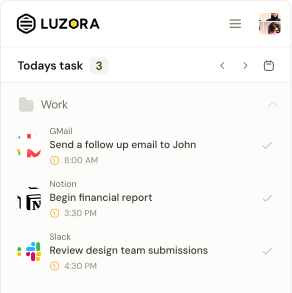

Luzora works best when the distance between noticing something and deciding what to do about it is almost invisible.
Version 1.0.9 makes that distance much shorter. The Add Task experience can now suggest useful actions based on the page you are viewing, guide you through when the task should happen and help you choose a time.
This release also makes the side panel more aware of where you are, puts your current streak somewhere you can appreciate it every day, improves keyboard navigation and draws a clearer boundary between extension data and your wider Luzora and Hive identity.
Here is what changed.
Task creation now gives you a useful place to begin
An empty description field can create unnecessary work. You may know that you want to return to the page in front of you but still need to decide what the action should be.
After Add Task opens, Luzora briefly studies the available page context and presents a small set of actions that make sense for that destination. A social post may suggest reviewing its performance or following up. A trading page may suggest checking a position or completing an exchange. An article may suggest reading, reviewing or continuing it.
These are starting points, not commands. You can ignore them and type your own task at any time.
Build the task one decision at a time
The suggestion experience follows three questions: What do you want to do? When should it happen? What time should Luzora bring you back?
Selecting an Action writes it directly into the description. Luzora then moves to When, where choices such as Today, Tomorrow, Twice weekly, Every weekday, Weekends and Monthly can be added. The Time step provides a compact hour selector and an animated AM or PM control.
Every choice becomes readable text in the description. You can see the task taking shape, continue typing and edit it at any point. Moving backwards and choosing something different updates the relevant part instead of forcing you to begin again.
Luzora Bolt follows the same principle. Its proposed action appears selected, but you can replace it immediately when another action fits better.
The description remains yours
The description keeps or regains focus after a suggestion is selected, and each inserted suggestion leaves a trailing space. Tap an option and continue typing naturally.
Closing the suggestion card does not remove it permanently. A quiet light-bulb control remains near the lower-right corner of the composer and expands back into the card when you need help.
The card enters gently and uses subtle directional motion between Action, When and Time. It responds softly to pointer movement without distracting from the draft.
Suggestions stay compact, even when there are more choices
Action and When options remain within two rows. When more choices are available, they continue horizontally instead of increasing the card's height. You can scroll or drag sideways, while soft edge fades show when more content is available.
Extra space beneath the draft also lets subtasks and the centred Add sub task control scroll fully above the suggestion card. This works in both the toolbar popup and the taller side panel.
The page you are viewing stays attached
When you choose an Action suggestion, Luzora captures the live page address at that moment. It also carries the recognised website name and icon into the Project field.
This matters most in the side panel, which can remain open while the browser page changes. Version 1.0.9 listens for tab changes and completed navigation, then refreshes the available context. New suggestions come from the page you are currently viewing—not the page that happened to be open when the panel started.
Older page scans cannot overwrite a newer result. If two checks finish out of order, Luzora keeps the context from the most recent page.
Luzora Bolt now uses the live tab from the side panel
In some side-panel sessions, pressing Bolt could prepare a task for a browser New Tab page rather than the webpage beside the panel. Bolt now resolves the live active tab before capturing the destination.
This page. This intention. The right place to return.
Your daily streak is now visible at a glance
The signed-in header now includes a compact streak pill showing your current daily streak from Luzora's existing consistency system. It uses the same completion history that powers the consistency view, so it is not a separate counter.
Hovering over the pill reveals a gentle Streak tooltip beneath it after a short delay. Consistency is now something you can appreciate whenever you open Luzora, not something you have to look up.
Extension deletion no longer means deleting your Hive identity
Luzora and the Hive are connected, but deleting extension data and requesting complete account deletion are different actions.
Delete extension data removes extension tasks, projects, folders, completion history, preferences and local extension account state. It does not silently erase the member's Hive identity, Hive Points, quests, referrals or wider Hive progress.
A complete deletion across Luzora remains a separate request through the Data Deletion page. The clearer boundary reduces the risk of someone removing more than they intended.
Small details make the extension feel calmer
- The BETA tag has a quieter neutral background
- The Home Bolt button no longer carries an unnecessary raised shadow
- Recovery guidance has more breathing room
- The streak tooltip appears beneath its control with a softer entrance
- Suggestion spacing, edge fades and scrolling behave consistently across layouts
- Task controls preserve their intended focus and typing flow across updates
Price alerts are not included in v1.0.9. Supporting work may exist in development, but cryptocurrency target-price monitoring remains unavailable in the published extension.
Open the page. Choose the action. Decide when.
Version 1.0.8 gave Luzora a persistent place beside your work. Version 1.0.9 makes that space more helpful.
Open Add Task on the page you want to return to. Choose an action that matches your intention, decide when it belongs and set a time if you need one. Edit as much or as little as you want, then let Luzora keep the page and the promise together.
The task still belongs to you. Luzora simply makes it easier to begin.