
Luzora v1.0.7 is now live.
Our previous release made Luzora faster, safer and more reliable. Version 1.0.7 focuses on what happens when someone first meets Luzora, and how easily they can turn that first interaction into useful work.
New members now receive a more personal introduction. Signing in is safer and clearer. Creating the first task feels more guided. Luzora also understands the page behind a task more accurately, particularly when you are working with email.
Here is what changed.
Onboarding now begins with you
A productivity tool should not assume everyone works the same way.
When someone joins Luzora, the new onboarding experience asks about the kind of work they do, the websites they regularly use and the activities they want to complete on those websites.
Luzora uses those answers to help create a practical starting routine.
A student might want to return to an online course three evenings each week. A creator might need to publish on YouTube and respond to comments. A job seeker may want to check new opportunities and follow up on applications.
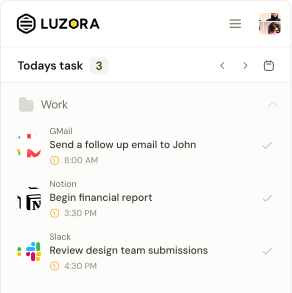
Instead of giving everyone the same empty task list, Luzora helps each person begin with something relevant to their life.
The experience also:
- Shows one focused question at a time
- Suggests websites based on the member’s work
- Provides three practical activity ideas for supported websites
- Lets members describe activities in their own words
- Turns selected activities into actual Luzora tasks
- Keeps answers safe if the extension closes midway
- Allows onboarding to be skipped without creating unwanted tasks
If someone decides to leave and start again, Luzora now asks before removing their progress.
Your first routine is ready before you enter Home
The new onboarding process does more than collect answers.
Before account creation, Luzora prepares the chosen activities as a routine. Members can review what will be created, make sure it reflects what they want and continue when they are ready.
Those tasks are only committed after the account is properly established. Refreshing an authorization window or retrying a sign-in cannot create the same onboarding tasks twice.
This gives new members a useful Home screen without risking duplicate or incorrectly owned tasks.
A guided tour helps you find your way
After setup, Luzora now offers a short, interactive tour.
The tour introduces the parts of the extension by showing them in context:
- Today’s tasks and folders
- The complete task list
- Luzora Bolt
- The Add New Task button
- The task description field
- Auto Return
The guide does not simply describe these features from a separate help page. It leads members to the actual controls they will use.
After the first task is created, Luzora also explains Auto Return and gives the member a clear opportunity to activate it.
The goal is simple: a new user should not have to explore every screen alone before understanding how Luzora can help.
Google and X sign-in now return to the extension
Signing into the extension should not accidentally take someone into the Hive.
Version 1.0.7 separates the extension authentication journey from the Hive experience. When members choose Google or X, the authorization window now returns the completed session to the extension.
Google sign-in also lets the user choose which Google account to continue with instead of silently selecting an account already open in the browser.
Email sign-in received smaller but important improvements too:
- Saved email suggestions wait until the email field is deliberately selected
- New members receive validation messages that fit account creation
- Members who skipped onboarding receive neutral, task-free signup messaging
- Returning members are taken into the appropriate password flow
- Verification and resend states are clearer
- Passwords are never written into saved extension state
Luzora understands the page behind your words
A task is more useful when it remembers where the work needs to happen.
Luzora now recognises more ways people naturally refer to the page they are viewing. Phrases such as “reply to this email,” “finish this article,” or “continue this course” can connect the task to a compatible open page.
Email received special attention.
When you create a task such as “reply to this email tomorrow” while viewing a message in Gmail or another supported webmail service, Luzora can retain the exact message address, not merely the general inbox.
It also follows clear safeguards:
- “This email” will not attach an unrelated webpage
- General mentions of email will not automatically capture the open message
- A link you explicitly provide takes priority
- A manually selected destination will not be overwritten later
- Subtasks can keep destinations separate from their parent task
This makes returning more precise. When the task comes back, Luzora has a better chance of bringing back the actual place where the action began.
Luzora Bolt gives you a clearer starting point
Luzora Bolt now presents the page it detected before you create the task.
The suggested action remains editable, but the original page stays attached even if you replace the suggested description with your own words.
This makes Bolt feel less like a generic task shortcut and more like what it was created to be: a quick bridge between the page you are viewing and the action you want to remember.
Auto Return is easier to understand and control
Auto Return has a redesigned on-page notification.
The new presentation clearly shows:
- Where Luzora is preparing to return
- The task connected to that destination
- How much time remains
- The option to cancel
- The option to go immediately
Members can now choose a countdown of 10, 20, 30 or 60 seconds.
The notification adapts to light and dark browser environments, remains compact and gives people enough information to understand what is happening before the page changes.
Auto Return remains optional. Website access is still requested only when the member decides to enable it.
A more consistent interface
Version 1.0.7 brings the extension’s major actions into the updated Luzora button system.
Primary, secondary, tertiary and text actions now share consistent sizing, colours, pressed states, disabled states and loading behaviour.
We also improved several surrounding details:
- Calendar month labels are visible and aligned
- Add Task warns before an unfinished draft is discarded
- The warning can be disabled and restored from Preferences
- Projectless tasks receive clearer visual identities
- Settings, privacy and account controls are better organised
- Username conflicts are handled more safely across sign-in methods
- Onboarding progress moves smoothly instead of snapping between steps
- Motion respects reduced-motion preferences
These changes are individually small, but together they make the extension feel more predictable.
What is not included in v1.0.7
Price alerts are not part of this release.
Some supporting work exists in development, but the feature remains deliberately hidden. Version 1.0.7 should not be presented as monitoring cryptocurrency prices or notifying members when a target price is reached.
This release is about onboarding, authentication, context capture, guidance and a more polished task experience.
Start with something that matters
Luzora v1.0.7 makes the first few minutes more useful.
It learns enough to help you begin. It guides you through the important controls. It keeps sign-in inside the extension. It connects your words to the right page more carefully. And when it is time to return, it gives you more control over how that return happens.
Open Luzora, create one task connected to something you genuinely want to complete, and choose when you want to see it again.
That is where consistency begins.